something like gt630 i think
SVPlayer for 🍎 iPhone | iPad | Apple TV and 🤖 Android | Android TV
SVP 4 for Windows | macOS | Linux: 30 days FREE TRIAL.
Read FAQ & follow SVP @ Facebook
You are not logged in. Please login or register.
SmoothVideo Project → Posts by Chainik
something like gt630 i think
TCmullet
try this
[deleted]
James D
so context menu would be opened with right click button only, not both left and right
what  ?
?
Mystery
Does it only affect areas that have artifacts
yep
in theory 
mashingan
I think really interesing part is
after I overclocked from 4.2Ghz to 4.7Ghz, under the exact SAME SVP setting which worked fine with no delayed frames or dropped frames in MPC+Madvr, the amount of artifacts decreased.
this's why I was asking about 'placebo'
cause I'm sure, as a developer , that SVP won't change anything in case of overclocking from 4.2 to 4.7 
and if he see something after overclocking - I can't even imagine what he possibly could find in a different video player
Blackfyre
after I overclocked from 4.2Ghz to 4.7Ghz, under the exact SAME SVP setting which worked fine with no delayed frames or dropped frames in MPC+Madvr, the amount of artifacts decreased.
are you familiar with the term "placebo"?
Blackfyre
it leaves SVP with a bigger head-room to use those resources (both the GPU for GPU-Acceleration & the CPU for making frames), thus resulting in less artifacts, because SVP has more resources to work with...
Good point but SVP is not smart enough to change settings according to available resources. 
Blackfyre
This's very simple process - SVP is making frames and video player is renedering them.
There're no options for video player to reduce artifacts created by SVP other than
a) drop some (intermidiate) frames
b) blend frames
If you set 4x in SVP then MPDN probably blends each ~2 frames so it may (or may not) look like fewer artifacts.
=====
BTW I tried MPDN about 3 month ago and I wasn't impressed at all
Оно не может дать меньше артефактов, ибо артефакты рисует не плеер, дело плеера честно показать уже нарисованные артефакты.
Ну а сам плеер - скромненько, страшненько это демонстрация технологии разработанного рендерера, а не плеер на каждый день.
ну нет - так нет
Nurk
Не, я в смысле что "это же сколько лишнего времени и сил у человека на такую ерунду"
Серьезно, бетатестерам давно пора обновить кровь. Может еще успеешь продвинуть что-то дефолтными параметрами в 3.1.7
suserg2
Все вопросы на тему "почему не работает OpenCL" направляйте в техподдержку AMD.
Also, does madVR still use ffdshow or not?
look at the picture one more time: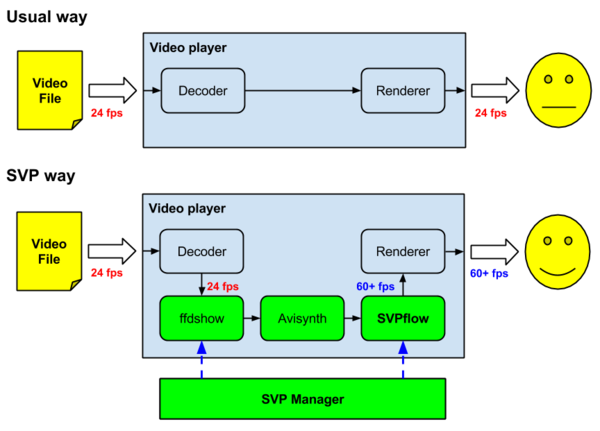
do you see that "ffdshow" square and "renderer" square are different ones?
How exactly does this work?
And what renderer was set before you changed it?
Cause it's supposed to be EVR-CP right after SVP installation.
1. Ensure that both video is rendered and SVP is working through NV card, not on i7's integrated one
2. Try to switch between plain EVR, EVR-CP and madVR video renderers
Так вроде там прямо заявляется что релиз для тех, кто любит накатывать из образа
S_Snake
а где тогда искать обновы?
amd.com?
не надо ставить драйверы видео из центра обновлений
CLinfo надо запустить, работает ли?
Remove '//' at the beginning of the line
anyway there's a "copy video url" option in HTML5 player too
yes, but victor170 doesn't want to download full episode
SmoothVideo Project → Posts by Chainik
Powered by PunBB, supported by Informer Technologies, Inc.